
⚙️ ASProBot Advanced Configuration
ASProBot provides 8 main tabs to control every aspect of bot behavior. Here's the complete explanation:
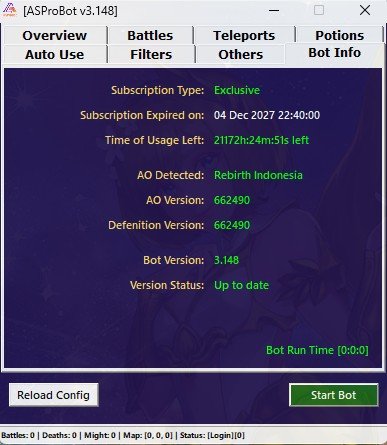
🧾 1. Bot Info
Displays key information about your subscription and current bot version:
- Subscription Type: The license type in use (Standard / Exclusive)
- Subscription Expired On: The expiration date of your license
- Time of Usage Left: Remaining usage time of the subscription
- AO Detected: The detected Atlantica Online server
- AO / Definition Version: Game client and data definition version
- Bot Version: The current version of the bot
- Version Status: Indicates whether your bot is up to date
- Bot Run Time: Duration the bot has been running in the current session
⚔️ 2. Battles
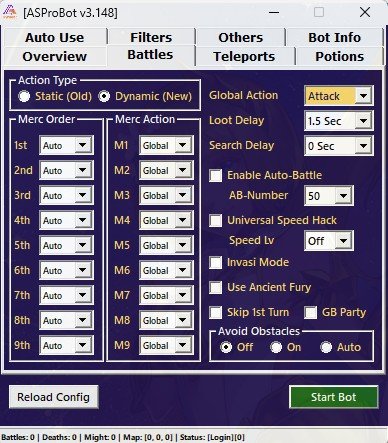
Used to configure how the bot behaves during battle:
- Action Type:
Static: Action follows the in-game Mercenary orderDynamic: Action follows the custom Merc Order set in the bot
- Merc Order & Merc Action: Define the attack order and specific action for each Mercenary
- Global Action: General action applied to all Mercs (only if Merc Action is set to "Global")
- Loot Delay / Search Delay: Delay time after killing a monster before looting, and delay in searching for monsters
- Auto Battle / AB Number: Enables in-game Auto Battle if remaining AB is greater than or equal to the set number
- Universal Speedhack & Speed Lv: Activates SpeedHack (use with caution; high detection risk)
- Invasion Mode: Automatically filters invasion monsters
- Avoid Obstacles: Attacks in-place without moving the character
🗺️ 3. Teleports
Manage favorite locations and teleport automation:
- Save coordinates in Favorite Maps
- If no monster / character died, teleport to specific location
- Auto Tele when AutoMove is enabled
- Lock character in current coordinates if needed

♻️ 4. Auto Use
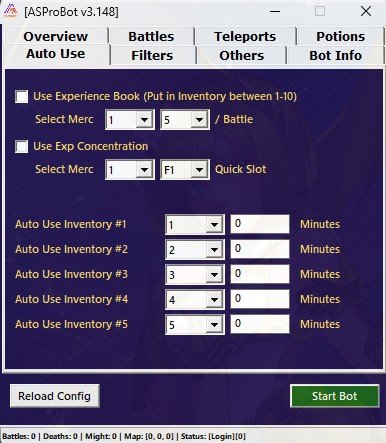
Automated use of support items:
- Experience Book: Bot will automatically use EXP Books (place in inventory slots 1–10)
- Exp Concentration: Use EXP concentration items from Quick Slot
- Auto Use Inventory #1–5: Use specific inventory items every set number of minutes
🧼 5. Filters
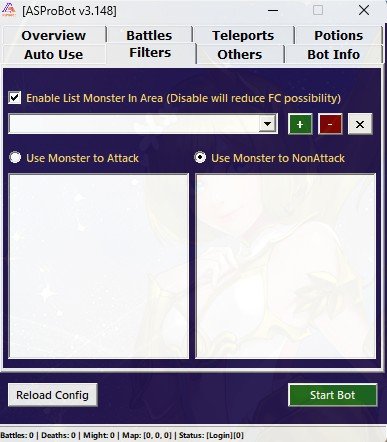
Filter which monsters to attack or ignore:
- Add monsters to the Attack list to target them
- Add monsters to the NonAttack list to avoid them
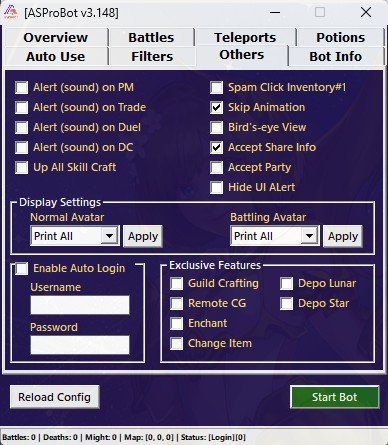
🛠️ 6. Others
Additional configuration for automation and quality of life:
- Alert (Sound): Enable sound notifications for PMs, Trade, Duel, Disconnect
- Other options include:
- Spam Click Inventory
- Bird's-eye View
- Auto Login (input username & password for auto-reconnect)
- Exclusive Features (only for Exclusive users):
- Auto Guild Crafting
- Auto Enchant
- Auto Change Item
- Remote CG, Depo Lunar, Depo Star
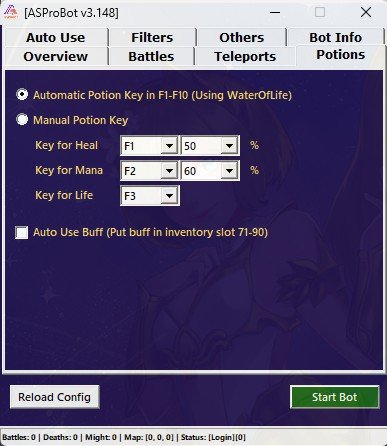
🧪 7. Potions
Configuration for automatic potion use:
- Automatic: Uses keys F1–F10 based on HP/MP percentage
- Manual: Set your own keys and HP/MP thresholds
- Auto Use Buff: Uses buffs automatically from inventory slots 71–90
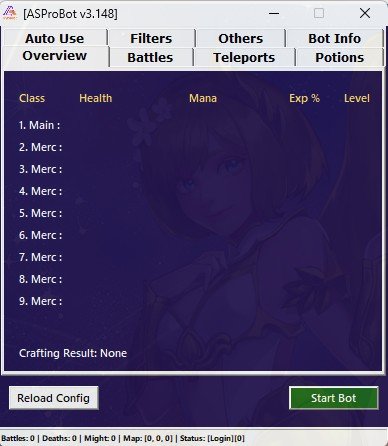
📊 8. Overview
Displays real-time status of main character and all mercenaries:
- Includes Health, Mana, EXP, and Level
- Shows Crafting Result if any crafting is active
➡️ Back to the Usage Guide