Auto Use
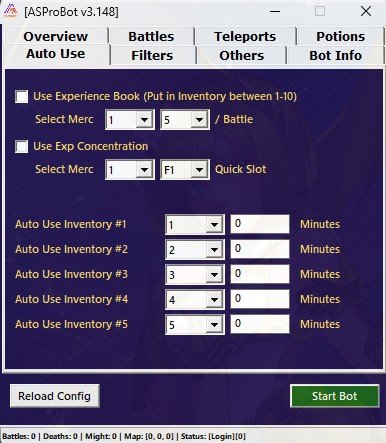
The Auto Use menu is used to automatically use support items.
This feature is useful for items such as EXP Books, Concentration items, or other support items that need to be used repeatedly.
What Auto Use Is Used For
From the Auto Use menu, you can configure automatic usage for:
- Experience Books
- Experience Concentration
- Inventory items
- Farming support items
- Selected event items
- Other items based on available slots and configuration
TIP
Use Auto Use for items that need to be activated regularly, especially during long farming sessions.
Experience Book
Experience Book is used to increase EXP gain while farming.
If this feature is enabled, the bot will automatically use Experience Books based on the available configuration.
Things to check:
- Make sure Experience Books are available in the inventory.
- Place the item in the inventory slot that matches the bot setting.
- Do not enable the feature if the item is not available.
NOTE
If the item is missing or placed in the wrong slot, the bot cannot use the Experience Book automatically.
Experience Concentration
Experience Concentration is used to support EXP gain through concentration items.
If this feature is enabled, the bot will use the item from the Quick Slot or the configured slot.
Make sure:
- The item is available.
- The item slot matches the configuration.
- The item has not run out.
- The game is not lagging or delayed.
Auto Use Inventory
Auto Use Inventory is used to automatically use items from specific inventory slots.
This feature is usually used for items that need to be reused at certain intervals.
Example:
Auto Use Inventory #1 = Specific item slot
Interval = several minutes
This means the bot will try to use the item based on the configured interval.
Item Usage Interval
Interval is the delay before the bot uses the item again.
Example:
Interval = 30 minutesThis means the item will be used again every 30 minutes if the feature is active and the item is available.
Use an interval that matches the item effect duration.
IMPORTANT
Do not set the interval too short if the item has a long effect duration. This may waste items unnecessarily.
How to Use Auto Use Safely
For initial usage:
- Prepare the item you want to use.
- Make sure the item is placed in the correct slot.
- Enable only the Auto Use feature you need.
- Set the interval according to the item duration.
- Run the bot and check whether the item is used correctly.
TIP
Enable one item first for testing. After confirming it works, add other items if needed.
If the Item Is Not Used
If the item is not used automatically, check the following:
- The item is available in inventory or Quick Slot.
- The selected slot is correct.
- The interval is configured.
- Auto Use is checked or enabled.
- The bot is running.
- The character is in a condition where the item can be used.
- The item is not on cooldown.
- The item can be used in the current condition.
If the Item Is Used Too Often
If the item is used too frequently:
- Check the interval value.
- Match the interval with the item effect duration.
- Make sure there is no duplicate Auto Use setting for the same item.
- Disable items that are not needed.
Recommended Setup for New Users
For initial usage, enable Auto Use only for important items first.
Recommended starting setup:
- Enable Experience Book if available.
- Enable Experience Concentration if used.
- Do not enable too many Auto Use Inventory options at once.
- Check whether the item is used correctly before long farming sessions.
Next Step
After configuring Auto Use, continue to Filters to choose which monsters should be attacked or ignored.
➡️ Filters