Filters
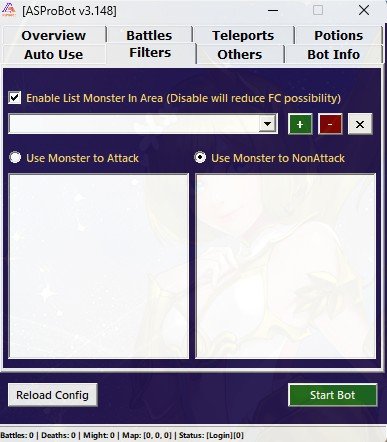
The Filters menu is used to determine how the bot selects monsters to attack.
This feature is part of the battle system. Users do not need to separately enable or disable filters, but they need to choose which filter type should be used.
What Filters Is Used For
Filters help the bot determine monster targets based on the selected list.
In this menu, you can choose one of the following filter types:
- Monster to Attack
- Monster not to Attack / Non Attack
IMPORTANT
Only one filter type is used at a time. Make sure you select the filter type that matches your farming needs.
Recommendation for New Users
For new users, it is recommended to use:
Monster not to Attack / Non AttackThis mode is easier to use.
If Non Attack mode is selected and the monster list is empty, the bot will attack all monsters found in the area.
This allows new users to start farming without selecting monsters one by one.
Monster to Attack
Monster to Attack mode is used when you only want the bot to attack specific monsters.
In this mode, the bot will only attack monsters added to the Monster to Attack list.
Example:
Monster to Attack:
- Monster A
- Monster B
With this setting, the bot will only search for and attack Monster A and Monster B.
WARNING
If Monster to Attack mode is selected but the monster list is empty, the bot will not battle because there are no selected targets.
This mode is useful if:
- You only want to attack specific monsters.
- You are farming items from certain monsters.
- The farming area has many different monster types.
- You want more specific target selection.
Monster not to Attack / Non Attack
Monster not to Attack or Non Attack mode is used when you want the bot to avoid certain monsters.
In this mode, the bot will attack all monsters in the area except monsters added to the Non Attack list.
Example:
Monster not to Attack:
- Monster C
- Boss D
With this setting, the bot will attack other monsters in the area but avoid Monster C and Boss D.
If the Non Attack list is empty, the bot will attack all detected monsters.
This mode is useful if:
- You want the simplest setup.
- You want the bot to attack all monsters in the area.
- You only want to avoid a few specific monsters.
- You are not sure which monsters should be targeted yet.
TIP
For initial usage, select Non Attack mode and leave the list empty. This is the simplest setup so the bot can start finding targets immediately.
Automatic Monster List
The available monster list is filled automatically based on monsters around the current character location.
This means you do not need to type monster names manually.
General usage:
- Move your character to the farming area.
- Open the Filters menu.
- Check the detected monster list in that area.
- Select the monster you want to add to the filter.
- Add it to the list based on the selected filter type.
NOTE
If a monster does not appear in the available list, make sure your character is in an area where that monster exists.
Two Filter Lists
The Filters menu has two list boxes to make it easier to switch filter modes.
The lists usually consist of:
- A list for Monster to Attack
- A list for Monster not to Attack / Non Attack
With these two lists, you can keep monster entries for each filter mode without setting them again from the beginning every time you switch filter type.
Simple Usage Examples
Normal Farming
If you want the bot to attack all monsters:
Filter Mode: Non Attack
List: Empty
Result: the bot will attack all monsters found in the area.
Avoid Specific Monsters
If you want to avoid certain monsters:
Filter Mode: Non Attack
List:
- Monster C
Result: the bot will attack all other monsters but avoid Monster C.
Attack Specific Monsters Only
If you only want to attack specific monsters:
Filter Mode: Monster to Attack
List:
- Monster A
- Monster B
Result: the bot will only attack Monster A and Monster B.
If the Bot Does Not Attack Monsters
If the bot does not battle, check the following:
- Make sure the character is in an area with monsters.
- Make sure the selected filter type is correct.
- If using Monster to Attack, make sure the list is not empty.
- If using Non Attack, make sure all monsters in the area are not added to the Non Attack list.
- Make sure Invasion Mode is not enabled outside an invasion event.
- Make sure Battles settings are correct.
TIP
If you are unsure, select Non Attack mode and clear the list first. If the bot starts attacking, the previous issue was likely caused by filter settings.
Filter Usage Tips
To use filters more easily:
- Use Non Attack for initial setup.
- Use Monster to Attack only when you need very specific targets.
- Do not add the same monster to both lists unless necessary.
- Recheck filters when moving to another farming area.
- Make sure the monster appears in the available list before adding it.
Next Step
After configuring Filters, continue to the Others menu to understand additional features.
➡️ Settings