Bot Info
The Bot Info page displays important information about ASProBot status, license, version, and the detected Atlantica Online server.
This section should be checked first after the bot opens successfully.
What Bot Info Is Used For
Bot Info helps you confirm that ASProBot is running correctly.
From this page, you can check:
- License status
- Subscription duration
- Remaining usage time
- Detected Atlantica Online server
- Bot version
- Definition version
- Update status
- Bot runtime
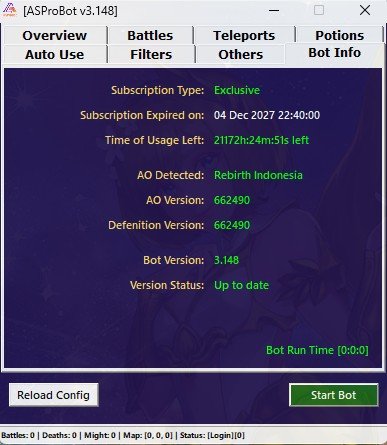
Subscription Type
Displays the type of license currently being used.
Example license types:
- Standard
- Exclusive
The license type may affect which features are available in the bot.
NOTE
If a certain feature is not available, check the license type first.
Subscription Expired On
Displays the date when the license expires.
If the license has expired, ASProBot cannot be used until the license is renewed.
Time of Usage Left
Displays the remaining license usage time.
This information helps you understand how long the license is still active.
If the remaining time is almost over, contact the administrator or reseller for renewal.
AO Detected
Displays the Atlantica Online server detected by ASProBot.
This is important to confirm that the bot is reading the correct game client.
If the server is not detected correctly, some features may fail to work.
AO / Definition Version
Displays the Atlantica Online client version and the definition version used by the bot.
Definitions are used so ASProBot can adjust its features to the currently running game version.
TIP
If Atlantica Online has just been updated and the bot does not work normally, check the version information in this section.
Bot Version
Displays the current ASProBot version.
Make sure the bot version is kept up to date through the launcher's automatic update system.
Version Status
Displays whether the current ASProBot version is up to date or needs to be updated.
If an update is available, follow the update notification shown by ASProBot Launcher.
Bot Run Time
Displays how long the bot has been running in the current session.
This is useful for monitoring the bot usage duration since it was started.
If Information Does Not Appear
If some information does not appear or looks empty, try the following:
- Make sure your internet connection is active.
- Make sure your license is active.
- Make sure ASProBot Launcher is not blocked by firewall or antivirus.
- Close ASProBot and Atlantica Online.
- Run ASProBot Launcher again as Administrator.
If the problem continues, contact the administrator or reseller.
Next Step
After confirming that Bot Info is displayed correctly, continue to battle configuration:
➡️ Battles